![logo_peach.png]](https://help.becreatives.co/hs-fs/hubfs/logo_peach.png?height=23&name=logo_peach.png)
With a more compact layout, clearer field names, and a smoother flow, it's now easier to provide all the details needed for your video request—without feeling overwhelmed.
What changed?
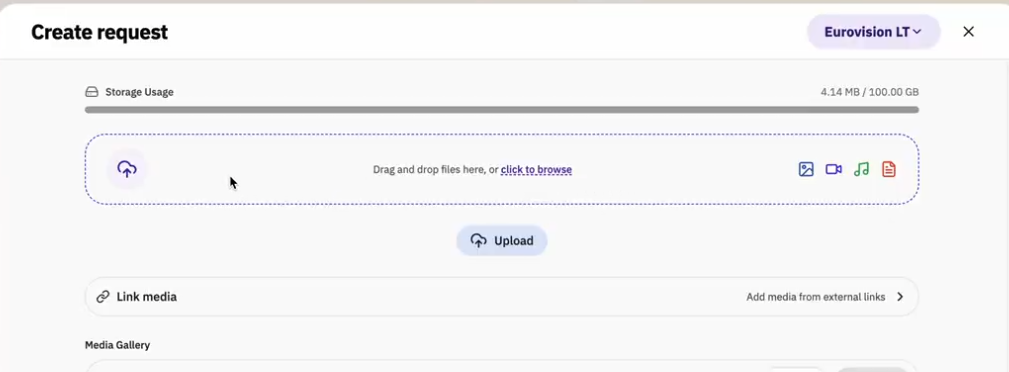
1. A more compact media upload section
The Upload Your Media section has been redesigned to take up less space, so you can see more of the request form at a glance.
2. Expanding text fields
The Description and Reference Videos fields now expand automatically as you type, making it easier to write detailed briefs and review your information.
3. "Examples" is now "Reference Videos"
We've renamed the Examples field to Reference Videos to better reflect its purpose. Use this field to share videos you'd like us to use as inspiration for your project.
4. The Resizes field has been removed
The dedicated Resizes field has been removed from the request form. If you'd like multiple versions of your video (for example, different aspect ratios), simply toggle on the Multiple Outcomes Project option right at the top of the request form, and include specific instructions for your editor in the Description field: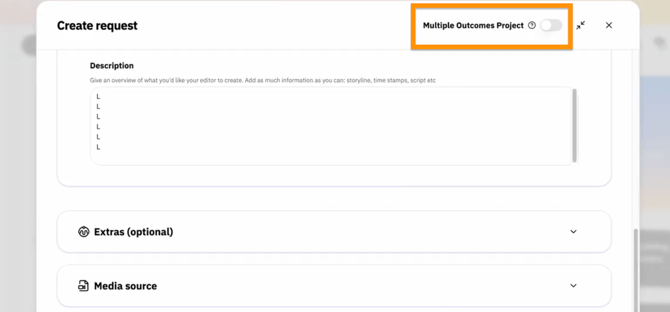
5. A simpler priority setting
The Priority option has been simplified to just two choices:
- Low
- High
This makes it quicker to indicate how urgently you'd like your request completed.
6. A smoother request flow
We've also reorganized the request form to create a more logical, intuitive experience from start to finish. The result is a cleaner interface with fewer distractions, making it easier to submit your requests with confidence.