![logo_peach.png]](https://help.becreatives.co/hs-fs/hubfs/logo_peach.png?height=23&name=logo_peach.png)
When you create a brand, you add logos, color schemes, fonts, and even editing styles particular to each brand, elements that should be reflected in the videos you request.
Then, whenever you place a video editing request, you select which brand the video belongs to, in order to achieve cohesiveness and keep things organized. Under the Scale plan, you are limited to only 2 brands, but with our Pro plan, you can add as many brands as you want!
Before submitting your first request, we recommend that you set up your own company's or your clients' brands:
1. First, visit the Brand dropdown menu at the very top of the page, and click on Create New Brand.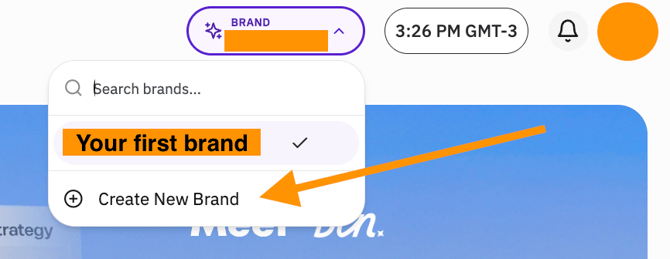
2. This will open our ben Assistant -- You will be co-creating your brand alongside ben. To begin, simply click on Let's Start:

3. You will then be asked to enter the following information:
- Your Brand Name
- Any websites or social media profiles related to your brand
- Your Niche or Area of Focus
- Any social media creators who inspire your brand (optional, only Instagram and Tiktok creators available at the moment)
- Any topics, subject matters, key words or industries relevant to your brand
4. Next, you will be asked whether you are selling something as part of your brand. If not, simply tick "I'm not selling anything yet".
5. Ben will then ask What tone do you want your content to have? Either Confident, Warm, Quirky, Professional, Inspirational, or a combination of any of these options.
6. Next, we will ask What's Your Biggest Content Goal Right Now? Either:
- Grow my audience
- Build credibility
- Sell more offers, or
- Stay consistent
8. Lastly, choose a color palette from the suggestions, or you can upload your color palette as part of the brand attachments.

Using brands will save you time when submitting requests and will give the editor easy access to all the information, cutting down on turnaround times. This way, you won't need to upload this type of information with every request -- You'll simply have select which brand the video belongs to, in order to achieve cohesiveness and keep things organized.
Feel free to add as many brands as you want! Just remember that Scale plan is limited to two, while the Pro plan supports unlimited brands.