![logo_peach.png]](https://help.becreatives.co/hs-fs/hubfs/logo_peach.png?height=23&name=logo_peach.png)
From new notification indicators to improved request sorting, these changes help you quickly spot what needs your attention, stay on top of conversations, and better manage your projects.
What changed?
1. Never miss an update
You'll now see an orange notification dot on your request status tabs when there's been a recent change in one of the projects, including whenever there's a new message from your editor. This makes it easy to spot when there's an update on one of your requests.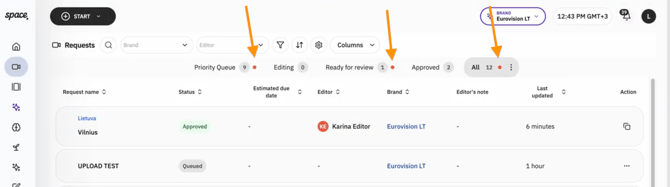
2. Clearer "Needs Attention" requests
If we need something from you before work can continue, your request will display a red accent bar.
This is your visual cue that your input is needed—whether that's providing additional footage, answering a question, or clarifying your brief. When you see this indicator, be sure to check the request conversation for details on what's required.

3. Request counts on every tab
Each request status tab now displays the number of requests it contains, giving you a quick overview of your account without needing to open each section.
4. Easier access to Drafts and Archived requests
The All tab now includes a dropdown menu where you can quickly switch between Draft and Archived requests:
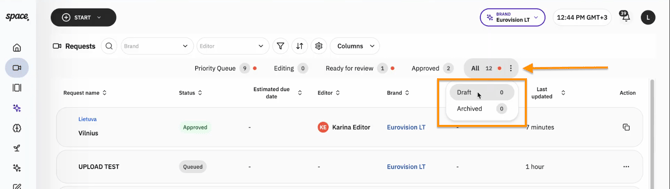
This makes it easier to find requests you're still working on or revisit completed projects.
5. Smarter request sorting
Requests under the Editing, Ready for review, Approved and All tabs now will now be sorted by Last Updated date by default.
That means your most recently active requests automatically appear at the top, making it easier to jump back into the conversations and projects that matter most.
In contrast, the Priority Queue will show the creation date ("Created At"), and the list will be sorted by request priority.