![logo_peach.png]](https://help.becreatives.co/hs-fs/hubfs/logo_peach.png?height=23&name=logo_peach.png)
Seamless Upgrades
Need a little more firepower to achieve your goals? No problem! You can now request an upgrade or add extra subscriptions whenever you need it. Simply reach out to our support team or proceed with your upgrade through the Space platform.
Upgrade via Space
To make the process even smoother, you can now request an upgrade directly through Space. (Only the owner can request the upgrade.) Just follow these simple steps:
-
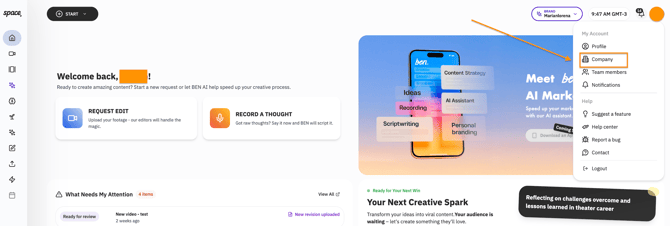
Go to the "Company" Section: Navigate to the "Company" tab within your Space account, or visit https://space.becreatives.co/company
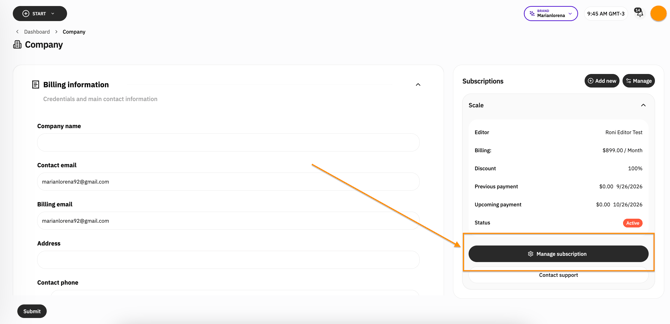
- Click on Manage Subscription > Update your subscription
-
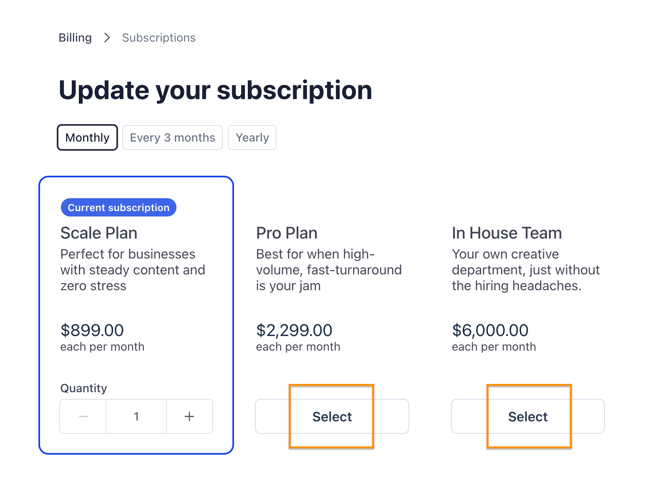
Select your new plan: From there, you can select a higher-tier plan such as Pro or In-House, and even switch to Quarterly or Yearly billing, to take advantage of discounted pricing:
What to Expect after an Upgrade
When you upgrade, we make sure the process is smooth and easy. If your account has enough credit, the upgrade will be seamless. If not, you’ll just pay the difference in pricing between the plans.
Issues?
If you run into any issues or need help in any way, please contact our Support team via the chat button or via email at support@becreatives.co, and we’ll assist you with your custom needs.
Get Started Today!
Upgrade through Space or contact our support team and take your projects to the next level!