![logo_peach.png]](https://help.becreatives.co/hs-fs/hubfs/logo_peach.png?height=23&name=logo_peach.png)
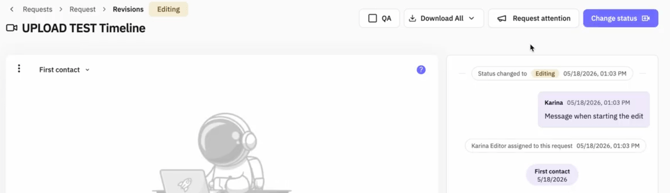
We've added an Activity Log to the Revisions Chat, giving you a clear, automatic timeline of everything happening on your request. There's nothing you need to do—the log updates itself whenever an important event takes place.
What changed?
The Revisions Chat now includes an automated Activity Log that records key milestones throughout your project's journey. This gives you a single place to see exactly what's happened and when.
What gets logged?
The Activity Log automatically records important updates, including:
- Status changes — when your request moves to Editing, Ready for Review, or Approved.
- Revision requests — when you request changes by selecting Needs Re-edit.
- Editor's Note — You'll now see the first message by your editor as part of your ongoing conversation in the revisions chat.
- Needs Attention notifications — when we need additional information from you before work can continue.
- File uploads — when new versions of your video or supporting files are added to your request.
- Project updates — other key milestones that help you follow your request from start to finish.
Why you'll love it
The Activity Log gives you a complete history of your request in one place, making it easy to:
- See the latest progress at a glance.
- Keep track of important milestones.
- Know when new files have been uploaded.
- Follow the journey of your request from submission to completion.
No more wondering when something happened—your Activity Log keeps everything organized in a clear, chronological timeline.