![logo_peach.png]](https://help.becreatives.co/hs-fs/hubfs/logo_peach.png?height=23&name=logo_peach.png)
What's in the email
Each summary covers your account at a glance:
- What moved last week: videos that changed status over the past seven days.
- Videos In Queue: videos waiting to be picked up by your editor.
- Videos In Editing: videos your editor is working on right now.
- Videos Waiting for your Review: finished videos that need your feedback or approval.
- Videos Delivered: the total number of videos we've delivered for you.
💡 Pro Tip!
Check the "Waiting for your Review" section first. Reviewing those drafts quickly keeps your queue moving.
How to turn it off
You can stop the weekly summary at any time from your notification settings:
- Click your avatar at the top right of the Space platform.
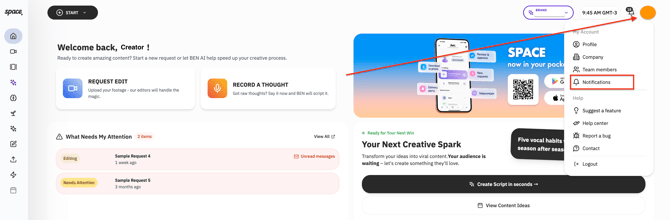
- Select Notifications.
- Switch off Weekly summary.
- Click Save.
Prefer to watch? Here's a short walkthrough video:
Changed your mind? Follow the same steps and switch Weekly summary back on.
FAQ
Why does my "Videos delivered" number look lower than expected?
If you joined beCreatives before July 2024, you might see a lower number of completed videos. The "delivered videos" count starts from July 2024, so videos delivered before then aren't included in the total. Your full delivery history is still safe; it just isn't counted in this email.
What day and time does it arrive?
Every Monday, covering the previous week.
Can I get it on a different day?
Not at the moment. The summary goes out on Mondays only.
Something in my summary doesn't look right.
Reach out to your Key Account Manager or our Support team (support@becreatives.co) and we'll be happy to look into it.