![logo_peach.png]](https://help.becreatives.co/hs-fs/hubfs/logo_peach.png?height=23&name=logo_peach.png)
With clearer request ordering, a simplified layout, and an updated tab name, it's now even easier to see what you're working on and prioritise what matters most.
What changed?
1. Numbered request order
Each request now displays a number next to the drag-and-drop handle, making it easy to see the exact order of your requests at a glance: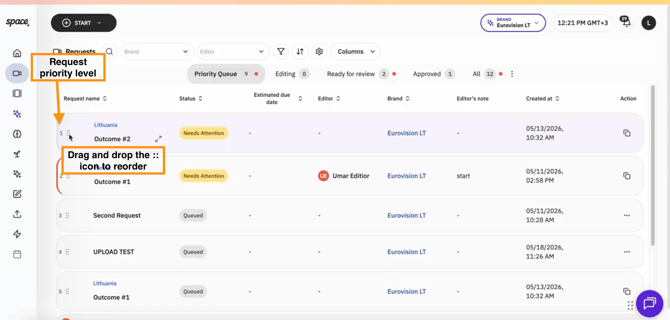
Simply drag and drop requests to rearrange them—the numbering updates automatically to reflect your preferred priority.
2. A cleaner list view
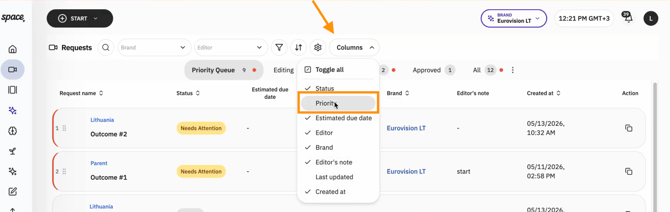
Since you will now have a clearly visible priority order, the Priority column has been removed from the default view to reduce clutter. Since you can now reorder requests using drag-and-drop, your request order naturally reflects your priorities.
If you'd still like to see the Priority column, you can add it back at any time using the Columns menu:
3. "Queued" is now "Priority Queue"
The Queued tab has been renamed to Priority Queue.
The new name makes it clearer that this is where your active requests live, allowing you to review, reorder, and manage them before they're completed.
4. More Visibility for Requests Marked as "Needs Re-edit" and "Needs Attention"
We used to display separate column: Status and Status Details column has been removed. "Needs Attention" and "Needs Re-edit" are now request statuses, making it the single place to check your project's progress.
Feel free to read more about this update here.
Why we made these changes
These updates are designed to make managing your requests more intuitive, with fewer distractions and a clearer overview of what should be worked on first.
Whether you're juggling a handful of videos or dozens of projects, your Priority Queue now gives you a simple, visual way to organize your workflow.