![logo_peach.png]](https://help.becreatives.co/hs-fs/hubfs/logo_peach.png?height=23&name=logo_peach.png)
What's changed?
We used to display separate column: Status and Status Details column has been removed. "Needs Attention" and "Needs Re-edit" are now request statuses, making it the single place to check your project's progress.
How it used to look:
How it looks now:
"Needs Attention" is now a status
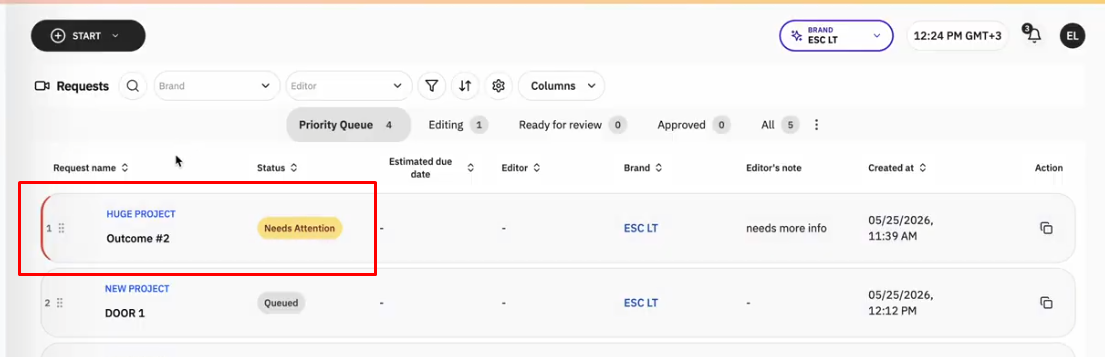
If we need something from you before work can continue, your request's status will change to Needs Attention.
When this happens:
- The status pill updates to Needs Attention.
- The request moves to the top of your Priority Queue, making it easier to spot and respond quickly.
- Be sure to check the Revisions Chat for a message explaining exactly what's needed so your project can move forward.
"Needs Re-edit" is now a status
When you request changes to your video, the status pill will update from Ready for Review to Needs Re-edit.
This makes it immediately clear that your feedback has been received and your request is being revised.
Needs Attention for Individual Outcomes
For Multiple Outcomes Projects, Needs Attention is now applied at the individual outcome level instead of the entire project.
This means that if we need clarification, additional footage, or other information for one outcome, only that outcome will be marked as Needs Attention. The rest of your outcomes can continue progressing as normal.
Quickly find what needs your attention
When one of your outcomes requires action, you'll see it highlighted at the top of the Priority Queue your dashboard, making it easy to spot projects that need your input.
Clear guidance on what's needed
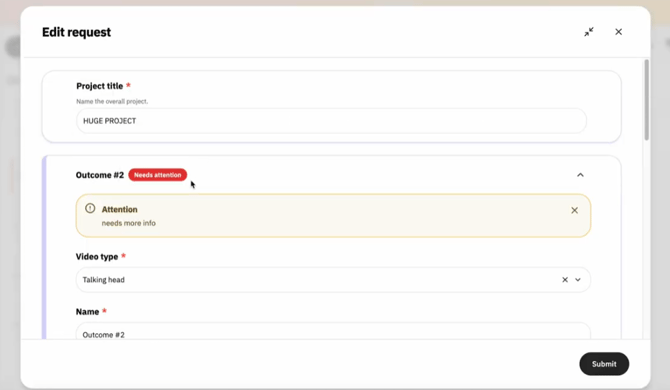
Opening the project will take you to the editable request, where the affected outcome is clearly marked with a red Needs Attention label.
You'll also find a message explaining exactly what's needed, so you can quickly provide the requested information and keep your project moving.
Why we made this change
Whether your project needs additional information, is being revised, or is progressing through editing, you can now see its current state at a glance without searching through multiple columns or views.
Also, by highlighting only the outcome that requires your attention, you can respond faster, avoid unnecessary delays, and allow the rest of your project to continue progressing while the required information is provided.