![logo_peach.png]](https://help.becreatives.co/hs-fs/hubfs/logo_peach.png?height=23&name=logo_peach.png)
Downgrading Made Simple
If you feel like your current plan offers more than you need, you can request a downgrade at any time. Whether you're using Space or contacting our Support team, we've made the process easy and straightforward.
Downgrade via Space
You can request a downgrade directly through Space (only the Company Owner can request subscription downgrades). To proceed, please follow these simple steps:
-
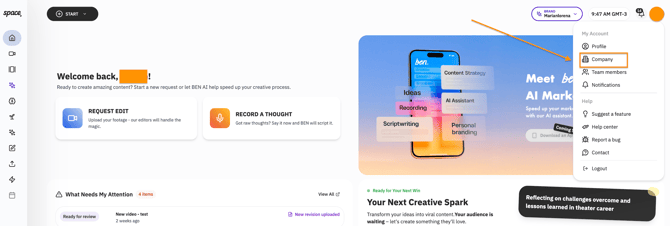
Go to the "Company" Section: Navigate to the "Company" tab within your Space account, or visit https://space.becreatives.co/company
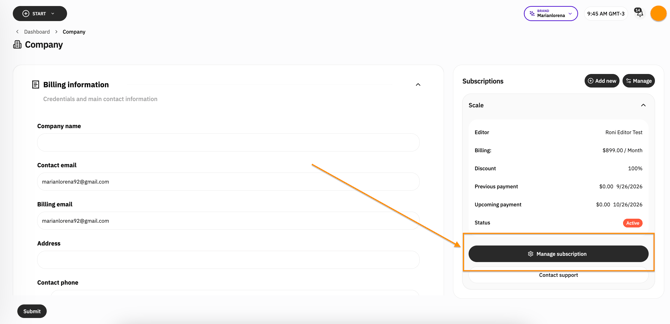
- Click on Manage Subscription > Update your subscription
-
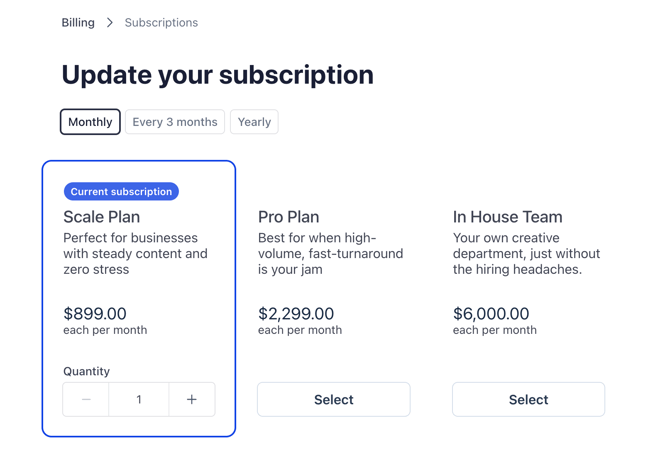
Select your new plan: From there, you can directly select a lower-tier plan, and even switch to Quarterly or Yearly billing, to take advantage of discounted pricing:
⚠️ Important: Downgrades at Renewal
Please note that downgrades requested through the Space platform will take effect at the time of your next subscription renewal, not immediately. This ensures that you get full value from your current plan, without any interruptions to your creative workflow.
If you'd prefer for the downgrade to take effect immediately (i.e. in the middle of your current billing cycle), please contact our Support team for assistance.
What to Expect after a Downgrade
When you request a downgrade, we ensure that everything runs smoothly. Your current plan will remain active until the renewal date, at which point your new, downgraded plan will take effect. Any remaining credits will continue to be applied to your new plan.